
Guarantee
Read-only access
A token minted with scope=read reads, and does nothing else. Not by convention: every method that is not a read is refused 403 Forbidden before the request reaches the endpoint, decided by the token's scope and the HTTP method alone.
That is what makes a read-scoped token the safe thing to hand to an exporter, a dashboard, a BI job or a monitoring probe: nobody has to read the receiving system's source to know it cannot change anything in the customer's Visena instance. This page is the demonstration rather than the assurance — the same token, refused a write, with the request that was sent and the response body that came back.
Getting one, in three moves
- Create an API credential — in the customer's Visena instance, or ask their administrator for the pair. The walkthrough in Credentials and tokens takes it through the interface, screen by screen.
- Ask for the read scope — request the token with
scope=readand nothing else. Scope is mandatory and never inferred: a token request that states no scope is refused 400 invalid_scope rather than quietly falling back to everything the credential holds. Every mint is therefore an explicit choice. - Send it as a bearer token —
Authorization: Bearer …on every call. Nothing else changes: same endpoints, same JSON, same paging.
curl -X POST https://api.visena.example/acme/auth/api/v1/token \
  -u "acme-partner-3f9a:$CLIENT_SECRET" \
  -d "grant_type=client_credentials" \
  -d "scope=read"

# 200 OK
{
  "access_token": "dcrEUVpMEpYqbdsDKawBb1yTqIAELMgqIO4KrN…",
  "scope": "read",
  "token_type": "Bearer",
  "expires_in": 86399
}
Replace the host with the base URL you were given at onboarding, and acme with the customer's instance name.
Two ceilings, not one
The scope you ask for is the lower ceiling: the one you keep narrow per job, and the one this page is about. Above it sits the credential's own ceiling — the set of scopes the credential is registered for at all. The administrator picks that when the credential is created, and it cannot be changed afterwards.
| Credential created as | Registered for | So it can mint |
|---|---|---|
| Read and write | read write |
a read token, and a read write token whenever a job needs one. |
| Read only | read |
read tokens and nothing else. 400 invalid_scope for anything more. |
The difference matters when you are asked what an integration can do, not just what it does. A credential created as read-and-write is read-only for as long as your jobs ask for read — but the same pair can mint a write token. A credential created as read-only cannot: the request for write falls outside its registered set and is refused by the authorization server, whoever asks and whichever job asks. That is the form to request from the customer's administrator when the integration is never meant to write.
Both ceilings apply at once, and the narrower one wins. This page shows the lower one at work; the upper one only moves how early a write is stopped — at issuance rather than at the request.
On-behalf credentials are registered for a different pair: act-as-user:read and act-as-user:write. act-as-user:read is their read-only form, and everything on this page holds for it. Asking such a credential for plain read falls outside its registered set and comes back 400 invalid_scope — see On-behalf credentials.
What the read scope rules out
The rule is about the request's HTTP method, not about what the endpoint behind it does. The safe methods — GET, HEAD and OPTIONS — require read. Every other method requires write. Nothing else enters the decision: not the path, not the request body, not the user behind the credential.
It is checked in a filter, after the bearer token has been validated and before the request reaches the endpoint — ahead of the body being parsed, ahead of field validation, and ahead of any per-user context being established.
| Request | With scope=read |
|---|---|
| GET fetch, list, cursor pages, change feeds, duplicate search | 200 — the whole read surface, unchanged. |
| POST create | 403 Forbidden |
| PUT replace | 403 Forbidden |
| PATCH update | 403 Forbidden |
| DELETE remove | 403 Forbidden |
Every read operation in the Partner API is a GET — fetching one record, the offset and cursor lists, the /timeline change feeds and the /duplicates search alike — so a read token reaches the full read surface and the method rule catches nothing a reader needs. The method is still what decides, though, not the intent: a search that took its criteria in a POST body would be refused too.
No user's permissions can widen it. The scope check runs before any per-user context is established, so it cannot consult the user behind the credential at all: a full administrator's credential, asked for scope=read, mints a token that is refused on every write exactly as a limited user's would be. The scope is the ceiling. What the user is allowed to do can only lower it, and that is decided later, inside the instance, on the requests that get that far.
Proof: the same token, refused a write
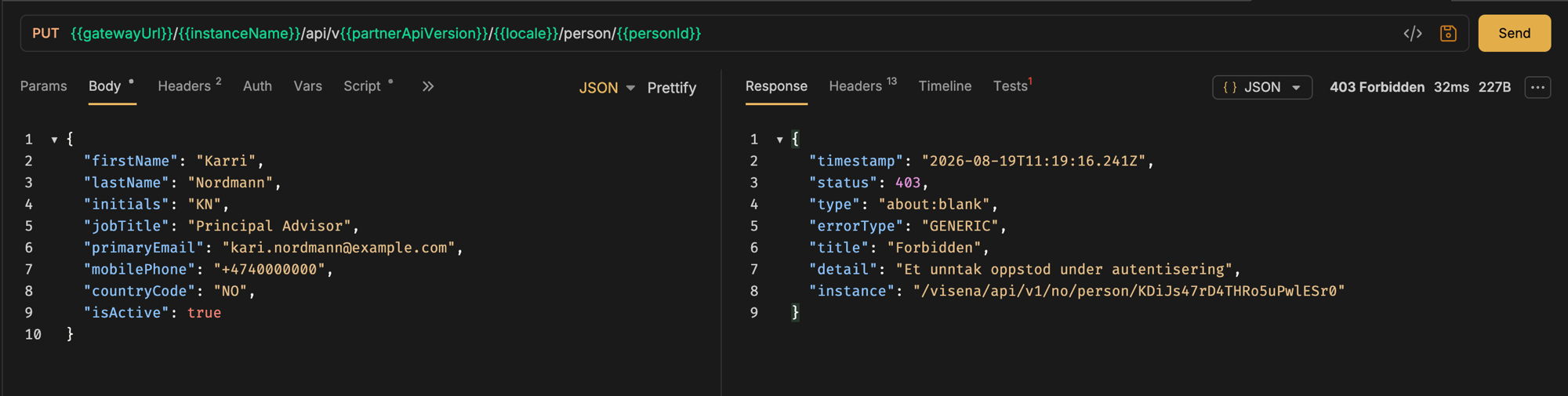
Here is the enforcement rather than the promise. The token below is the one that has just read a person; now it attempts a PUT against that same person. The exchange is a real capture, against a development instance named visena with the no locale segment — substitute the customer's instance name and the locale you call with.
PUT https://api.visena.example/visena/api/v1/no/person/KDiJs47rD4THRo5uPwlESr0
Authorization: Bearer <access_token>   ← minted with scope=read
Content-Type: application/json

{
  "firstName": "Karri",
  "lastName": "Nordmann",
  "initials": "KN",
  "jobTitle": "Principal Advisor",
  "primaryEmail": "kari.nordmann@example.com",
  "mobilePhone": "+4740000000",
  "countryCode": "NO",
  "isActive": true
}HTTP/1.1 403 Forbidden
Content-Type: application/problem+json
{
"timestamp": "2026-08-19T11:19:16.241Z",
"status": 403,
"type": "about:blank",
"errorType": "GENERIC",
"title": "Forbidden",
"detail": "Et unntak oppstod under autentisering",
"instance": "/visena/api/v1/no/person/KDiJs47rD4THRo5uPwlESr0"
}That body is an RFC 9457 problem document, served as application/problem+json — the shape every error on the Partner API uses, described in Errors and troubleshooting. type is about:blank, which in RFC 9457 means the status code carries the whole meaning, and title is that status code's reason phrase. So the thing to act on in code, and the thing to show a reviewer, is the 403 on a write: match the status, not the detail string, which is a general platform message and does not name the scope.
The write is refused before it reaches the data. The request never gets to the endpoint, so there is no partial change to find and nothing to roll back.
When to reach for it
- Exports, dashboards and BI — anything whose job is to leave Visena as it found it.
- A first integration milestone — get reading right end to end, then widen the scope when you actually start writing.
- Third parties and consultants — a token that cannot write is a much shorter conversation than one that can.
- Monitoring and reconciliation — compare Visena against another system with no possibility of «fixing» it by accident.
When a job needs both, mint two tokens from the same credential — read for the reading path, read write for the writing one — rather than giving the whole job write access. They are two separate mints from the same pair, so it costs one extra token request and no extra credential.
Create a credential and a token
Credential, token and first call through the Visena interface, screen by screen.
ReferenceTokens and scopes
The scope rules in full, a token cache to copy, and every token-endpoint error.
ReferenceAPI reference
Every endpoint, parameter and response shape — and which of them a read token can call.