
Guide
Credentials and tokens
A credential identifies your integration inside one customer's Visena instance; an access token is the short-lived proof you send with every call. This page is the mechanics of both — created in seconds, revocable in one call, and the secret is shown exactly once.
Concepts defines what a credential, a token and a scope are, and where each one lives. This page assumes you have read that and want to make them. It is three jobs that belong together, so it is long on purpose:
- Manage API credentials — the credential API: create, list, revoke, rotate.
- Create a credential and a token in the interface — the same journey click by click, with every screen shown.
- Get an access token — the token request, the scope rules, a cache to copy, and the errors.
Manage API credentials
A credential is a pair: a clientId that names it and a clientSecret that proves it. Everything below happens inside one customer's instance, against that instance's own URL — under /{instanceName}/auth/api/v1/. The credential endpoints carry a {locale} segment after the version — /acme/auth/api/v1/en/credentials — while the token endpoint does not.
The credential API authenticates with a Visena user session (the X-ACCESS-TOKEN cookie of a logged-in user) — not with a bearer token. This is deliberate: a machine credential cannot create more credentials.
Who creates it
Credentials are created inside the customer's instance, authenticated with a Visena user login — so in most integrations, the customer's Visena administrator creates the credential and hands you the pair through a secure channel. The requests below document what happens in that step, whether it is you or the customer performing it.
Create a credential
Two fields, both required:
| Field | Value |
|---|---|
label | A label that says what the credential is for. Label it after the system that will hold it — you will thank yourself when rotating or revoking later. |
accessLevel | READ_ONLY or READ_WRITE — the ceiling on everything the credential can ever issue, and it cannot be changed afterwards. Omit the field and the endpoint answers 400: the level is not something the platform guesses. Two ceilings, not one explains how it relates to the scope you ask for per token. |
A credential created through this API always acts as the user who creates it. For one that acts as somebody else, it is created in the interface instead — see on-behalf credentials.
curl -X POST https://api.visena.example/acme/auth/api/v1/en/credentials \
  --cookie "X-ACCESS-TOKEN=<your Visena login session>" \
  -H "Content-Type: application/json" \
-d '{ "label": "erp-sync-prod", "accessLevel": "READ_WRITE" }'{
"id": "aX8k2m",
"label": "erp-sync-prod",
"clientId": "acme-partner-3f9a",
"accessLevel": "READ_WRITE",
"clientSecret": "vco_9tK2…",
"createdAt": "2026-08-21T09:14:03.482+02:00"
}The clientSecret appears exactly once — in this response. Visena stores only a one-way hash and can never show it again. Put it straight into your secret manager. If it is lost or leaked, there is no «reveal» and no reset: create a new credential and revoke the old one.
List your credentials
Listing returns metadata only — never a secret. Use it to see what exists and find the id you need for revocation.
curl https://api.visena.example/acme/auth/api/v1/en/credentials \
  --cookie "X-ACCESS-TOKEN=<session>"

# 200 OK
[
  { "id": "aX8k2m", "label": "erp-sync-prod", "clientId": "acme-partner-3f9a",
    "accessLevel": "READ_WRITE", "createdAt": "2026-08-21T09:14:03.482+02:00" }
]
Revoke a credential
Revocation is a DELETE on the credential's id (the masked id from create/list — not the clientId).
Revocation is immediate and permanent. The credential can no longer issue tokens, and tokens it already issued stop working within about a minute. There is no undo and no re-issue of the same pair: everything still holding it needs the new credential from a fresh create. The row is not deleted — it stays in the overview marked Tilbakekalt (Revoked), carrying the time and who did it.
curl -X DELETE https://api.visena.example/acme/auth/api/v1/en/credentials/aX8k2m \
  --cookie "X-ACCESS-TOKEN=<session>"

# 204 No Content — done
Rotation, in three moves
- Create the replacement — same label convention, e.g.
erp-sync-prod-2026q4. Both credentials work during the switch; there is no downtime window. - Deploy the new pair — update your secret store, roll your services, confirm token minting works with the new
clientId. - Revoke the old credential —
DELETE …/credentials/{id}. Anything still using it fails fast and loudly, which is exactly what you want.
Rotate on a schedule that matches your security policy, and always when a person with access to the secret leaves the project.
On-behalf credentials
When your integration must act as a specific user — say, filing documents in the name of a case worker — ask the customer's administrator for an on-behalf credential for that user. These are issued through Visena's administration tooling, not the self-service API above. They behave identically with two differences:
- Token requests must use the
act-as-user:scopes —act-as-user:read act-as-user:writefor a credential created as Les og skriv (Read and write),act-as-user:readalone for one created as Bare lesing (Read only). Asking for plainread writereturns 400 invalid_scope. - Every change is recorded with both the subject user and your acting identity, and mutation responses carry an
actedByfield naming the actor.
Handling the pair. Treat clientSecret like a production database password: secret manager, never in git, never in a ticket or chat message, one credential per system and environment (don't share a pair between staging and production).
Create a credential and a token in the interface
The same journey, done click by click in the Visena web application: create a credential, exchange it for a token, fetch your first record — with every screen shown. This is the user-interface route, the one a customer's administrator normally takes.
The screenshots show the Norwegian interface, because origo's interface is Norwegian in every instance. The English term follows each label in the text, so you can find the button that is actually on the screen.
-
Open the API credentials page. In Visena, follow Admin → Tilgangskontroll → Administrer API-tilganger (Access control → Manage API credentials). The page lives at
/admin/access-control/api-credentialsand lists every credential in the instance.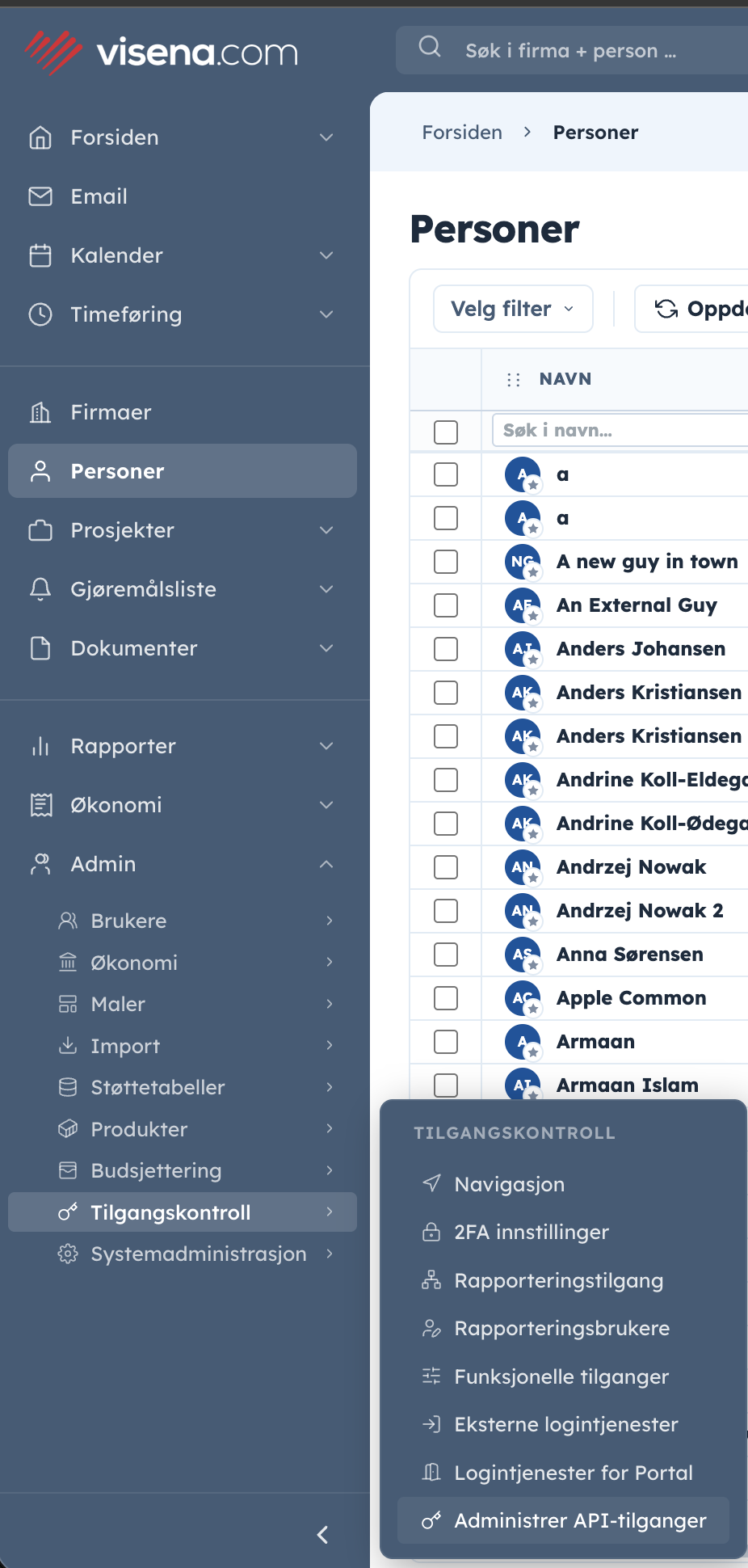
Administrer API-tilganger («manage API credentials») sits under Admin → Tilgangskontroll («access control»). -
Create the credential. Click Ny API-tilgang (New API credential). The dialog asks for three things:
- Navn (Name) — free text, so you can recognise the credential later. Name it after the system that will hold it:
erp-sync-prodbeatsmy-token. - Gjelder for (Applies to) — Meg selv (Myself) or På vegne av en annen (On behalf of someone else). Pick the latter and a person picker appears; that person becomes the credential's aktør (actor): the API client does everything as them, with exactly the access they have in origo, while you are recorded as its creator. Step 4 below shows how the choice reads in the overview.
- Tilgang (Access) — Les og skriv (Read and write) or Bare lesing (Read only). This is the ceiling on everything the credential can ever mint, and it cannot be changed afterwards: choose Bare lesing when the integration is never meant to write, and it cannot obtain a token that does. Two ceilings, not one explains how it relates to the scope you ask for per token.
Then Opprett (Create).
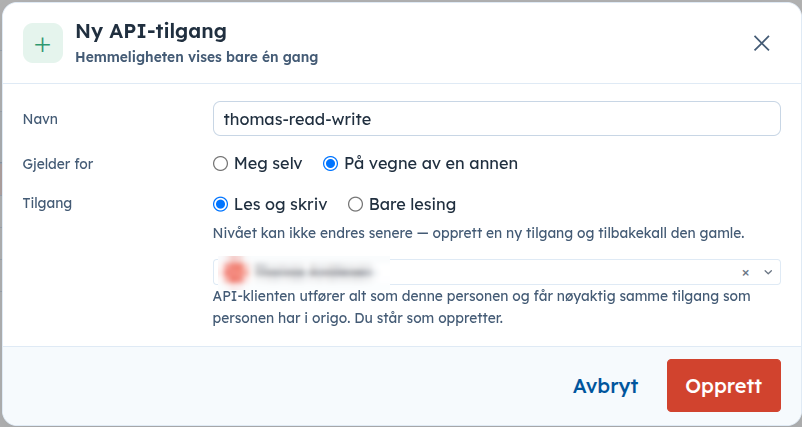
The Ny API-tilgang («new API credential») dialog. Its subtitle warns you up front: the secret is shown only once — Hemmeligheten vises bare én gang. Tilgang («access») is the choice that cannot be changed afterwards. The person's name is redacted here. - Navn (Name) — free text, so you can recognise the credential later. Name it after the system that will hold it:
-
Copy the client id and the secret. The credential is created, and Visena shows the two values the OAuth 2.0 flow needs:
- Klient-ID (Client ID) — identifies the credential. This is your
client_id. - Klienthemmelighet (Client secret) — a
vco_…value that acts as the password. This is yourclient_secret.
✓Copy the secret before closing the dialog. Visena stores only a one-way hash, so this is the one moment it exists in readable form. Put it straight into your secret manager. If it is lost there is no reveal and no reset: create a new credential and revoke this one.
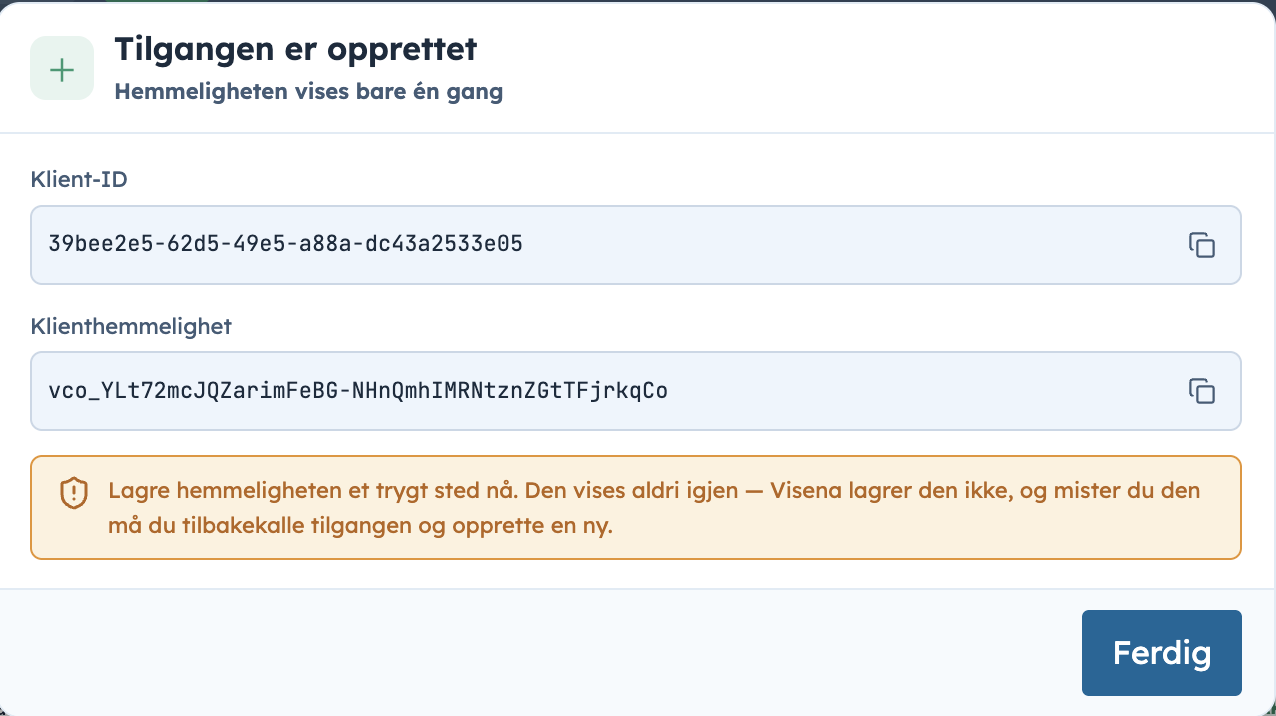
The one-time Tilgangen er opprettet («the credential was created») dialog — copy both values now. - Klient-ID (Client ID) — identifies the credential. This is your
-
Know who the token acts as. Every credential is tied to a user identity, and calls made with its tokens act as that user, with that user's permissions. The Gjelder for choice from step 2 decides who that is:
Choice The token authenticates as Meg selv
MyselfThe person who created the credential. Aktør (Actor) and Opprettet av (Created by) then name the same person — you. På vegne av en annen
On behalf of someone elseThe user you picked. The overview shows them under Aktør (Actor) and you under Opprettet av (Created by). Tokens for these credentials must be requested with the act-as-user:…scopes; see on-behalf credentials.The overview lists every credential with its name, client id, Aktør (Actor), Tilgang (Access), status, Sist brukt (Last used) — stamped when a token from the credential is used against the API, not when the token was fetched — and when it was created, and by whom:
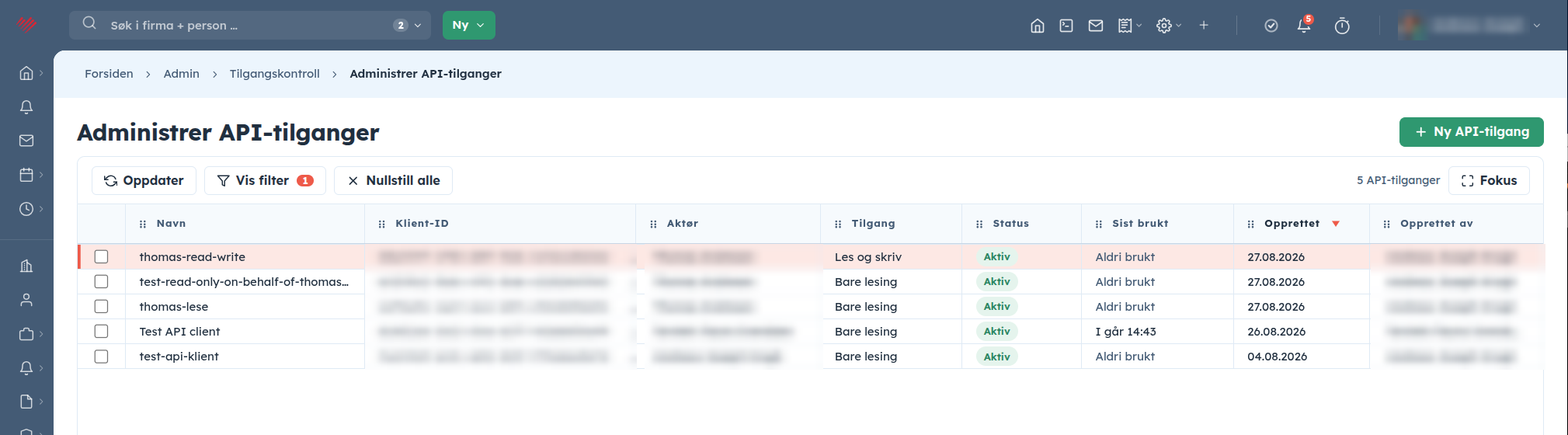
Aktør («actor») is the identity the token acts as — the column to check before putting a credential to work. The client ids and person names are redacted here; on screen they are in plain text. -
Exchange the credential for a token. POST the pair to the gateway's token endpoint with the standard OAuth 2.0
client_credentialsgrant. The screenshots below send the credential in the form body, which is what an API client does by default; for production, HTTP Basic is the recommended form — both are covered under the token request.EndpointPOST {baseUrl}/{instanceName}/auth/api/v1/token Content-Type: application/x-www-form-urlencodedField Value grant_typeclient_credentialsscopeWhat the token may do: read,writeorread write. Mandatory — there is no default.client_idThe Klient-ID from step 3 client_secretThe Klienthemmelighet from step 3 iOnly reading? Ask for
scope=read. Such a token can never mutate anything, no matter what the underlying user is allowed to do — Read-only access shows that guarantee being enforced, with the 403 to prove it.Request — curlcurl -X POST https://api.visena.example/acme/auth/api/v1/token \ -H "Content-Type: application/x-www-form-urlencoded" \ -d "grant_type=client_credentials" \ -d "scope=read" \ -d "client_id=<your Klient-ID>" \ -d "client_secret=<your Klienthemmelighet>"Response — 200 OK{ "access_token": "dcrEUVpMEpYqbdsDKawBb1yTqIAELMgqIO4KrN…", "scope": "read", "token_type": "Bearer", "expires_in": 86399 }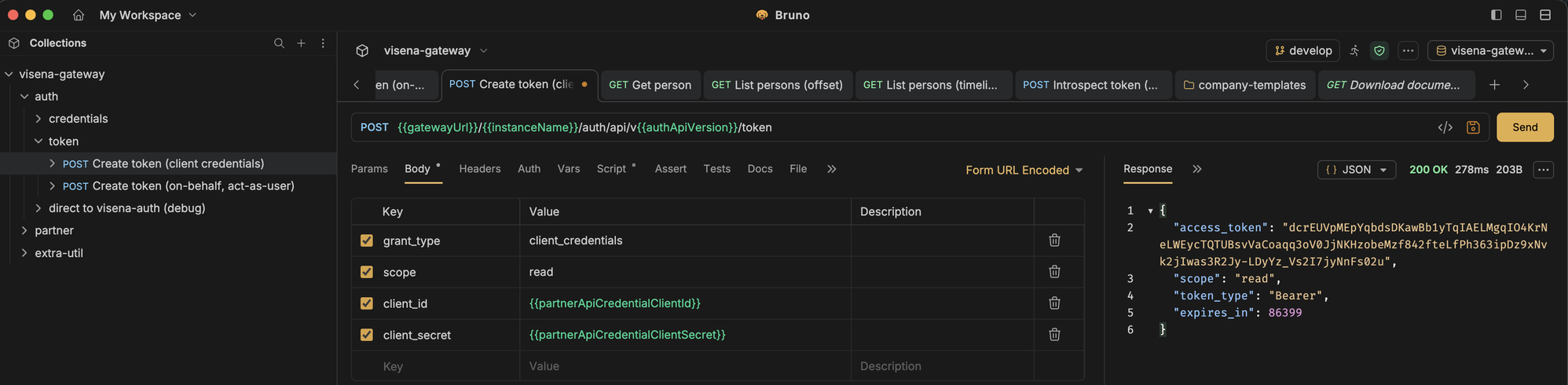
The token request in an API client — note scope: readin both the request and the response.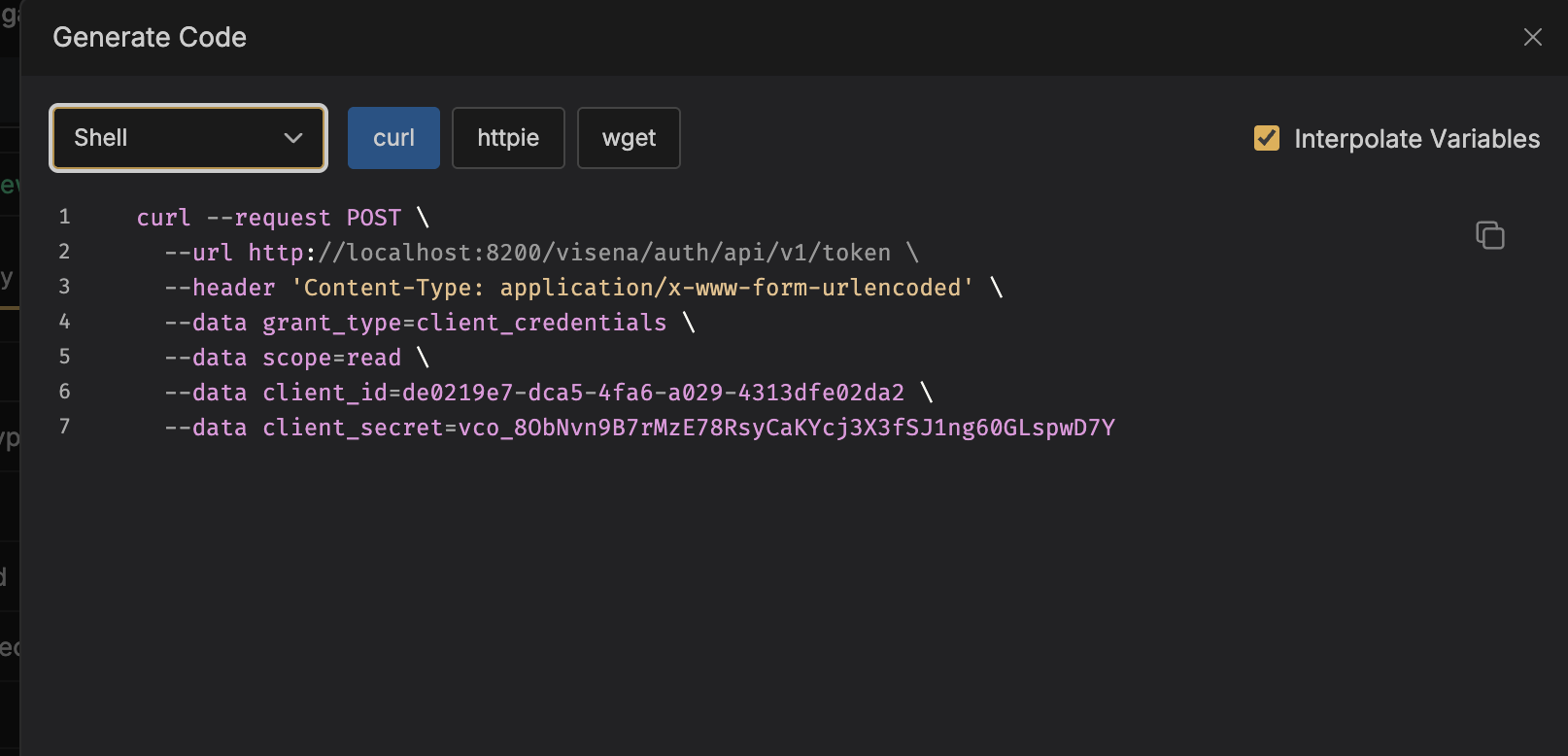
The same request as a generated curl command. This screenshot targets a local development gateway; yours is the base URL from onboarding. The token is opaque, lives for
expires_inseconds, and there is no refresh token: when it expires, repeat this request. Cache the token has the pattern, and the error table the full list of token-endpoint failures. -
Make the first call. Send the token as a Bearer header to the resource server through the same gateway. The path carries the instance name, the API version and the locale — fetching one person, for example:
Request — curlcurl "https://api.visena.example/acme/api/v1/en/person/KDiJs47rD4THRo5uPwlESr0" \ -H "Authorization: Bearer <access_token>"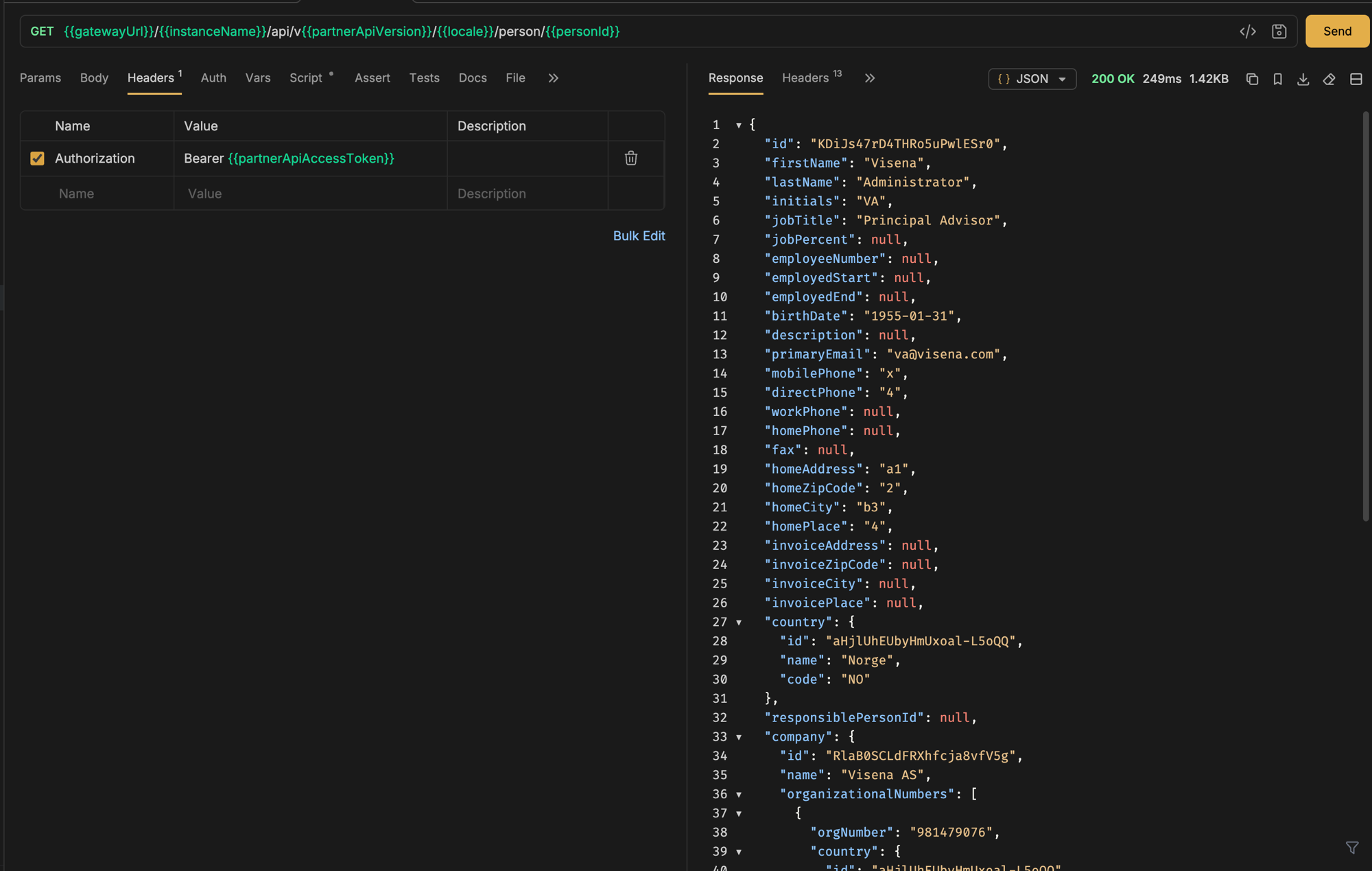
A person fetched through the gateway — plain JSON, authenticated by the Bearer header alone. 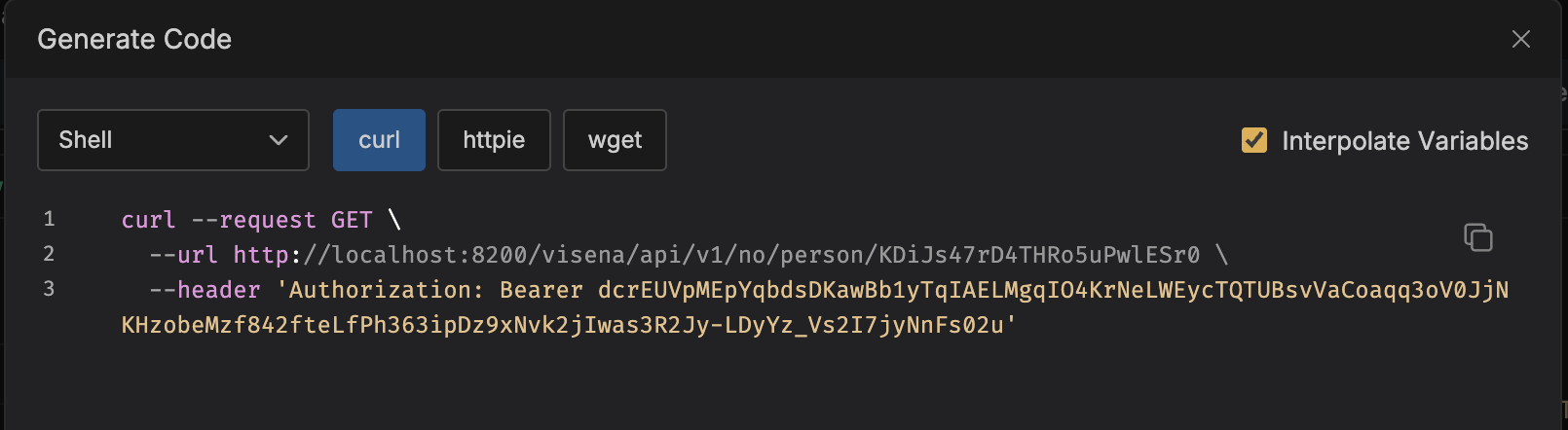
The same call as a generated curl command.
That is the whole loop: credential → token → call. From here, Making requests covers URL anatomy, masked ids, locales and the shapes every endpoint returns, and Read-only access covers what scope=read rules out.
Get an access token
One standard OAuth 2.0 request turns your credential into a short-lived bearer token, scoped to exactly what you ask for.
The token request
POST to /{instanceName}/auth/api/v1/token with the client_credentials grant. That is the whole path: the instance name, then the fixed auth/api/v1 auth surface, then token — no locale segment, and nothing between. Authenticate with HTTP Basic (recommended) or with client_id/client_secret form fields — both are standard OAuth 2.0.
curl -X POST https://api.visena.example/acme/auth/api/v1/token \
  -u "acme-partner-3f9a:$CLIENT_SECRET" \
  -d "grant_type=client_credentials" \
-d "scope=read write"{
"access_token": "PhVYGf3qK9t2Zx0CmW8rNbL5aTuJdEwSyAoQiHkXgMfDzUcRvBnOl46E…",
"scope": "read write",
"token_type": "Bearer",
"expires_in": 86399
}access_tokenis opaque — an unreadable string, not a JWT. Never try to decode or inspect it; just send it back as a bearer header.expires_inis seconds until expiry. Read it from the response every time — never hardcode a lifetime.- There is no refresh token. When the token expires, run the same request again.
Setting scopes — the rules
Scope is mandatory and explicit. A token request without a scope parameter is rejected with 400 invalid_scope — the platform never guesses what you meant to ask for.
You may request your credential's full scope set or any subset of it:
| Your credential | Registered for | Valid scope values |
|---|---|---|
| Plain · Les og skriv | read write | read write · read · write |
| Plain · Bare lesing | read | read |
| On behalf of · Les og skriv | act-as-user:read act-as-user:write | act-as-user:read act-as-user:write · act-as-user:read · act-as-user:write |
| On behalf of · Bare lesing | act-as-user:read | act-as-user:read |
Ask for read in export jobs and dashboards, and for the write scope only in the jobs that actually change something.
Asking for a scope your credential does not hold — including asking an on-behalf credential for plain read write — returns 400 invalid_scope. The scopes are then enforced per request: GETs need the read scope, all mutations need the write scope. A token minted with read only gets 403 on every POST/PUT/PATCH/DELETE.
Cache the token, don't hammer the endpoint
Mint once, reuse until shortly before expiry, then mint again. A 60-second safety margin absorbs clock skew and in-flight requests:
const baseUrl = "https://api.visena.example";
const instanceName = "acme";

let cachedToken = null;
let cachedTokenExpiresAt = 0;

async function getAccessToken() {
	if (cachedToken && Date.now() < cachedTokenExpiresAt - 60_000) {
		return cachedToken;
	}
	const basicAuth = Buffer
		.from(`${process.env.VISENA_CLIENT_ID}:${process.env.VISENA_CLIENT_SECRET}`)
		.toString("base64");
	const response = await fetch(`${baseUrl}/${instanceName}/auth/api/v1/token`, {
		method: "POST",
		headers: {
			"Authorization": `Basic ${basicAuth}`,
			"Content-Type": "application/x-www-form-urlencoded"
		},
		body: "grant_type=client_credentials&scope=read%20write"
	});
	if (!response.ok) {
		throw new Error(`token request failed: ${response.status}`);
	}
	const token = await response.json();
	cachedToken = token.access_token;
	cachedTokenExpiresAt = Date.now() + token.expires_in * 1000;
	return cachedToken;
}
When the token endpoint says no
Token-endpoint failures use the standard OAuth 2.0 error body — { "error": "…", "error_description": "…" }:
| Status | Error | Meaning · what to do |
|---|---|---|
| 401 | invalid_client |
Wrong client_id/client_secret, or the credential was revoked. Check the pair; if it was rotated, deploy the new one. |
| 400 | invalid_scope |
Scope missing, or not held by this credential. State exactly the scopes you need. |
| 400 | invalid_request / invalid_grant |
Malformed form body or wrong grant_type — it must be client_credentials. |
| 404 | — | Unknown instance name in the URL. Verify the first path segment. |
| 502 / 503 | — | Temporary platform issue — retry with exponential backoff. |
That OAuth error body is the token endpoint's own shape. Everything behind the token — the business API you call with it — answers with RFC 9457 problem documents instead; see Errors and troubleshooting.